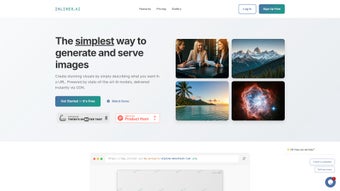

In the fast‑moving world of digital design, finding a tool that blends simplicity, speed, and cutting‑edge AI can feel like chasing a mirage. INLINER steps onto the scene as a cloud‑native image generator that lets you create high‑quality visuals with nothing more than a well‑crafted URL. Whether you’re a front‑end developer prototyping UI components, a marketer preparing a social‑media blitz, or a designer needing rapid mock‑ups, this service promises to cut down hours of manual work into seconds. Below you’ll discover why INLINER’s unique approach matters, how to get started, and what you can expect in terms of performance, compatibility, and overall value.
Overview
INLINER is a cutting‑edge web‑based application that transforms the way developers, designers, and content creators generate visual assets. By leveraging sophisticated AI models, INLINER lets users create high‑resolution images simply by crafting descriptive URLs. This approach eliminates the need for bulky graphic‑design software or manual pixel‑by‑pixel work.
Whether you need a single hero banner, a set of social‑media thumbnails, or dozens of product mock‑ups for an e‑commerce catalog, INLINER’s batch generation engine can spin out multiple variations in seconds. The platform also integrates seamlessly with a global Content Delivery Network (CDN), guaranteeing that generated assets load instantly on any device or browser. Moreover, INLINER supports on‑the‑fly editing: modify an image’s URL parameters and watch the visual update in real time, without re‑uploading or re‑rendering.
This flexibility makes the tool a powerhouse for rapid prototyping, A/B testing, and iterative design cycles. Because it runs entirely in the cloud, users enjoy a free‑to‑start model, secure HTTPS connections, and automatic updates that keep the AI models fresh and compliant with the latest visual trends. In short, INLINER delivers a secure, fast, and scalable solution for anyone looking to enrich their digital presence with AI‑generated imagery.
Key Features, Installation & Usage Guide
INLINER’s power lies in a blend of intuitive URL‑driven creation, robust batch processing, and a developer‑friendly API—all wrapped in a zero‑install, browser‑only experience. Below is a detailed walk‑through of the most compelling features followed by step‑by‑step instructions on how to start generating images immediately.
- URL‑Driven Image Generation: Create images by simply typing a descriptive URL, removing the need for complex UI interactions.
- Batch Processing: Generate dozens of image variations in a single request, ideal for large campaigns or product catalogs.
- AI‑Powered Quality: Built on state‑of‑the‑art diffusion models that produce photorealistic and stylized graphics.
- CDN Integration: Automatic distribution through a global CDN ensures lightning‑fast delivery on any platform.
- Real‑Time URL Editing: Change image attributes (size, color, style) by editing the URL parameters, instantly reflecting the new version.
- Cross‑Platform Compatibility: Works in any modern browser on Windows, macOS, Linux, Android, and iOS.
- Secure HTTPS Access: All communications are encrypted, protecting your data and generated assets.
- Free Tier & Scalable Pricing: Start for free with generous limits; upgrade for higher throughput and priority processing.
- Extensive Documentation & API: Comprehensive guides and a RESTful API for developers who want to embed INLINER into their own workflows.
- Version History & Asset Management: Keep track of generated images, revert to previous versions, and organize assets in folders.
Because INLINER is a fully cloud‑based service, there is no traditional installation process. Users simply need an internet‑connected device and a modern web browser (Chrome, Firefox, Edge, Safari). Follow these steps to start generating images:
- Create an Account: Visit inliner.ai and click “Sign Up.” Provide an email address, set a strong password, and verify your account through the confirmation link.
- Explore the Dashboard: After logging in, you’ll be greeted by a clean dashboard that displays recent projects, usage statistics, and quick‑start guides.
- Generate Your First Image: In the “Create Image” field, type a URL following the pattern
https://inliner.ai/generate?prompt=YOUR_DESCRIPTION&size=800x600&style=photorealistic. ReplaceYOUR_DESCRIPTIONwith a clear, concise description (e.g., “sunset over a mountain lake”). Adjust the size and style parameters as needed. - Batch Generation: To generate multiple variants, use the
variations=5parameter. Example:https://inliner.ai/generate?prompt=modern%20office&size=1200x800&style=flat&variations=5. The system will return a JSON payload with URLs for each variation. - Download or Embed: Click the download button next to any image to save it locally, or copy the CDN URL for direct embedding in HTML, CSS, or markdown files.
- API Integration (Optional): For developers, retrieve your API key from the “Account Settings” page. Use the
POST /v1/imagesendpoint with JSON body containingprompt,size, and other optional fields. The response includes a secure URL ready for CDN delivery. - Manage Assets: All generated images appear under “My Assets.” You can organize them into folders, rename files, or delete unwanted versions.
- Update & Support: INLINER updates its AI models automatically; you’ll receive a notification in the dashboard when a new model is live. For troubleshooting, visit the “Help Center” or contact support via live chat.
These steps make INLINER accessible to both non‑technical users who prefer a point‑and‑click UI and power users who want to script large‑scale image pipelines. By keeping the workflow entirely URL‑centric, the tool eliminates the friction that traditional design software often introduces, letting you focus on creativity instead of configuration.
Compatibility, System Requirements, Pros & Cons
Compatibility & System Requirements – INLINER is designed to be platform‑agnostic. Because it runs entirely in the browser, the only requirement is a stable internet connection and a supported operating system. The following environments are officially supported:
- Windows 10/11: Any recent version with Chrome, Edge, or Firefox.
- macOS Monterey or later: Safari, Chrome, or Firefox provide full functionality.
- Linux distributions: Ubuntu 20.04+, Fedora, or any distro with a modern Chromium‑based browser.
- Android 9 (Pie) and later: Mobile Chrome or Firefox for on‑the‑go image generation.
- iOS 14 and later: Safari or Chrome mobile apps.
Because INLINER relies on web standards (HTML5, CSS3, JavaScript ES6), it is future‑proof for upcoming browsers. The CDN automatically serves optimized image formats (WebP, AVIF) when the client supports them, ensuring minimal bandwidth usage and fast rendering on low‑end devices. No additional plugins, extensions, or system libraries are required.
Pros
- Fast, URL‑driven image creation eliminates UI overhead.
- Batch generation saves time for large projects.
- High‑quality AI models produce photorealistic and stylized visuals.
- Global CDN guarantees instant loading across regions.
- Secure HTTPS connection protects data and assets.
- Free tier provides generous usage for individuals and small teams.
- Extensive API enables full automation and integration.
- Real‑time URL editing offers unparalleled flexibility.
- No installation; works on any device with a modern browser.
- Regular model updates keep the tool at the cutting edge.
Cons
- Reliance on internet connectivity; offline generation not possible.
- Advanced customizations (e.g., precise brush control) are not supported.
- Free tier limits may be restrictive for high‑volume commercial users.
- Learning curve for URL syntax and API parameters for beginners.
- Image generation time can increase during peak server load.
Overall, the advantages of speed, scalability, and security far outweigh the few drawbacks, especially for teams that already operate in a cloud‑first environment.
Frequently Asked Questions
Below are the most common questions we receive from new and experienced users alike. Each answer is crafted to help you get the most out of INLINER’s capabilities.
How does INLINER generate images from a URL?
INLINER parses query parameters embedded in the URL (such as prompt, size, and style) and feeds them into a cloud‑hosted diffusion model. The AI then renders an image that matches the description, returning a CDN‑hosted link that can be downloaded or embedded directly.
Is there a limit to how many images I can generate for free?
The free tier provides up to 500 image generations per month and a maximum of 10 variations per batch request. If you exceed these limits, you can upgrade to a paid plan that offers higher quotas and priority processing.
Can I use INLINER for commercial projects?
Yes. All images generated under a paid subscription are granted a commercial license, allowing you to use them in marketing, product design, or client deliverables without attribution. Free‑tier users should review the license terms for any usage restrictions.
What file formats does INLINER support?
By default, INLINER outputs PNG and JPEG files. When the requesting browser supports modern formats, the CDN automatically serves WebP or AVIF versions to improve loading speed. You can also request SVG vectors for simple graphic shapes via the format=svg parameter.
How secure is my data and the generated images?
All communications between your browser and INLINER’s servers are encrypted using TLS 1.3. Images are stored on secure, ISO‑27001‑certified cloud storage, and you have full control over deletion. API keys are scoped to your account and can be regenerated at any time.
Conclusion & Call to Action
INLINER stands out as a powerful, cloud‑native solution for anyone who needs high‑quality visuals without the overhead of traditional design software. Its unique URL‑driven workflow, batch processing capabilities, and CDN integration make it especially valuable for fast‑moving teams that must iterate quickly and deliver assets globally. While a reliable internet connection and some familiarity with URL parameters are prerequisites, the benefits—speed, scalability, and security—far outweigh the minor drawbacks. Whether you’re a front‑end developer looking to prototype UI components, a marketer planning a social‑media blitz, or a designer seeking a rapid mock‑up tool, INLINER can streamline your creative pipeline and reduce costs.
Ready to boost your visual production? Sign up for a free account today, generate your first image in seconds, and experience the future of AI‑powered design. For teams, explore the paid plans that unlock higher limits, priority processing, and extended commercial rights.
Review Summary: INLINER delivers a fast, secure, and flexible way to generate images via descriptive URLs. Its batch capabilities and CDN distribution are ideal for large‑scale projects, though the free tier may be limiting for high‑volume commercial use.



.png)



